Backup and Storage for Audio
Summary
Abstract
Backup and storage strategy is critical for audio professionals managing terabytes of session data. The community strongly advocates the 3-2-1 backup rule (three copies, two media types, one offsite) and warns against relying solely on cloud sync services. Hardware choices between SSD, HDD, and NAS depend on whether files are active sessions or long-term archives.
Detail
Backup Strategies
The 3-2-1 rule is the foundation of professional audio backup: keep three copies of your data, on two different media types, with one stored offsite. Active sessions should live on fast local storage, with regular backups to a secondary drive and periodic offsite or cloud backup. Sync software must be configured carefully to avoid propagating accidental deletions.
Source
Author: cian riordan — Date: 2021-11-03 — Channel: daw-talk “The use case here is let’s say you’re working on a project and you (or the DAW) has accidentally deleted a necessary file. Now lets say you don’t notice and you go to run your end of day backup — your sync software will know that that file was deleted, and then delete it off your backup.”
Storage Hardware (SSD vs HDD vs NAS)
- SSD — fast read/write speeds ideal for active sessions; NVMe drives handle large track counts and virtual instruments without bottlenecks
- HDD — cost-effective for archival storage; slower but available in larger capacities
- NAS (Network Attached Storage) — centralized storage accessible across multiple machines; redundancy via RAID configurations
Source
Author: cian riordan — Date: 2023-10-26 — Channel: daw-talk “I have a 5-bay Drobo that I use as my archival storage. Once a project is done and delivered, I move it off the work drives onto the Drobo. It’s got roughly 13TB of information on it — basically everything I’ve worked on in the past 15 years.”
Cloud Storage for Audio
Cloud services like Backblaze, Google Drive, and Dropbox can serve as offsite backups, but auto-sync features are dangerous for audio sessions. A DAW deleting a temp file can trigger cloud sync to delete the backup copy. Manual or scheduled uploads are safer than real-time sync for session folders.
Archive Workflows
When a project is delivered, professionals typically consolidate all session files, bounce stems, and move the complete package to archival storage. This includes saving session notes, plugin recall sheets, and any relevant correspondence. Naming conventions and folder structures should be consistent across all archived projects.
Disaster Recovery
Time Machine on macOS provides basic versioned backup but has limitations for large audio sessions — it can slow down during recording and may not handle external drives gracefully. Dedicated backup software with versioning (Carbon Copy Cloner, ChronoSync) offers more control for audio professionals.
NAS, ZFS, and Enterprise Storage (from nerd-talk)
The nerd-talk channel produced 58 messages on NAS/ZFS storage — including both pinned messages in the channel — making it the most detailed NAS/storage resource on the entire server. popthetrunk’s TrueNAS configuration guides are the centerpiece.
Why NAS for Audio?
A NAS (Network Attached Storage) provides centralized, redundant storage accessible from any machine on the network:
- Multiple computers can access the same archive without manually copying files between drives
- RAID configurations provide redundancy — A single drive failure does not mean data loss
- Dedicated storage hardware separates your archive from your workstation, improving both performance and reliability
- Remote access — Access archived sessions from anywhere on your network (or remotely with proper configuration)
ZFS vs btrfs — File System Comparison
The nerd-talk community strongly favors ZFS for audio archival:
| Feature | ZFS | btrfs |
|---|---|---|
| Data integrity | End-to-end checksums, self-healing with redundancy | Checksums available but less mature |
| RAID implementation | Native RAID-Z (Z1, Z2, Z3) — mature, battle-tested | RAID 5/6 still considered experimental |
| Snapshots | Copy-on-write snapshots, very fast | Copy-on-write snapshots, fast |
| Compression | LZ4 (recommended), ZSTD, GZIP | LZ4, ZSTD, ZLIB |
| ECC RAM support | Strongly recommended (detects memory corruption) | Not specifically optimized for ECC |
| Community verdict | ”Bulletproof data protection” | Fine for basic NAS use, but ZFS preferred for critical archives |
TrueNAS/ZFS Configuration for Audio (from popthetrunk’s Pinned Messages)
Dataset configuration for Pro Tools sessions:
- Change ZFS record size to 1M (default 128K is suboptimal for large audio files)
- Enable LZ4 compression — It is fast enough to be transparent and saves meaningful space on audio archives
- Prioritize CPUs with many PCIe lanes (AMD Epyc or Threadripper) for maximum drive throughput
- Invest in ECC RAM before spending on non-RAM caches — ECC prevents silent data corruption that could destroy your archive
Synology NAS optimization:
- Add SSD read-only cache to accelerate access to frequently-used archived sessions
- Max out system RAM — NAS operating systems use free RAM as cache, and more RAM means faster browsing/searching of large archives
- If using Synology’s btrfs, understand that it provides good-enough data integrity for most users, but ZFS (via TrueNAS) is the gold standard for bulletproof protection
NAS Hardware Recommendations
| Component | Recommendation | Why |
|---|---|---|
| NAS OS | TrueNAS (formerly FreeNAS) | Best ZFS implementation, enterprise-grade, free |
| Alternative | Synology DSM | Easier setup, good btrfs support, less technical |
| RAM | ECC RAM, as much as possible | ZFS uses RAM for ARC cache; ECC prevents data corruption |
| Drives | NAS-rated HDDs (WD Red Pro, Seagate IronWolf Pro) | Designed for 24/7 operation, vibration-resistant |
| RAID level | RAID-Z2 (minimum) | Survives 2 simultaneous drive failures |
| Network | 10GbE if streaming active sessions | 1GbE is fine for archive access only |
Logic Pro Backup Tips (from logic-pro)
Package vs Folder for Backup: Logic sessions saved as packages (single macOS bundle) are more portable and self-contained than folder-based sessions. For backup and sharing, packages are recommended because they prevent broken file references. Always run Consolidate (File > Project Management > Consolidate) before sharing to ensure all referenced audio is inside the package (spectrummasters, logic-pro).
Logic Cloud Collaboration Limitations:
- Dropbox issues with packages — Dropbox can struggle with Logic packages (macOS bundles), sometimes failing to sync individual files within the bundle or corrupting the package structure (Iwan Morgan, logic-pro)
- Compress before upload — always compress Logic packages to .zip before uploading to Dropbox, Google Drive, or other cloud services. This prevents cloud sync from interfering with the internal package structure (Mark_Tarlton, kalpipal, logic-pro)
Time Machine: Set Time Machine to back up at least twice daily for active projects. This provides versioned backups that can recover accidentally deleted audio files or corrupted sessions (spectrummasters, logic-pro).
NAS Caution: Logic has known issues with non-macOS formatted drives. Running sessions directly from a NAS (particularly Linux-formatted NAS volumes) can cause file path errors, missing audio, and session corruption. Keep active Logic sessions on macOS-formatted local drives and use NAS only for archival (hyanrarvey, logic-pro).
Practical Application
- Follow the 3-2-1 backup rule: three copies, two media types, one offsite
- Use SSDs for active sessions and HDDs or NAS for completed project archives
- Disable real-time cloud sync on session folders to prevent accidental deletion propagation
- Consolidate and collect all files before archiving a completed project
- Schedule regular backups rather than relying on remembering to do them manually
Common Mistakes
- Relying on a single drive with no backup at all
- Trusting cloud sync as a primary backup (auto-delete propagation risk)
- Not consolidating session files before archiving, leading to missing audio references
- Using Time Machine as the sole backup for professional work
- Failing to test backup restores — a backup you cannot restore is not a backup
See Also
- Computer Hardware for Audio — drive and system recommendations
- Audio File Management — file organization and formats
- Session Templates and Organization — project structure best practices
Community Screenshots
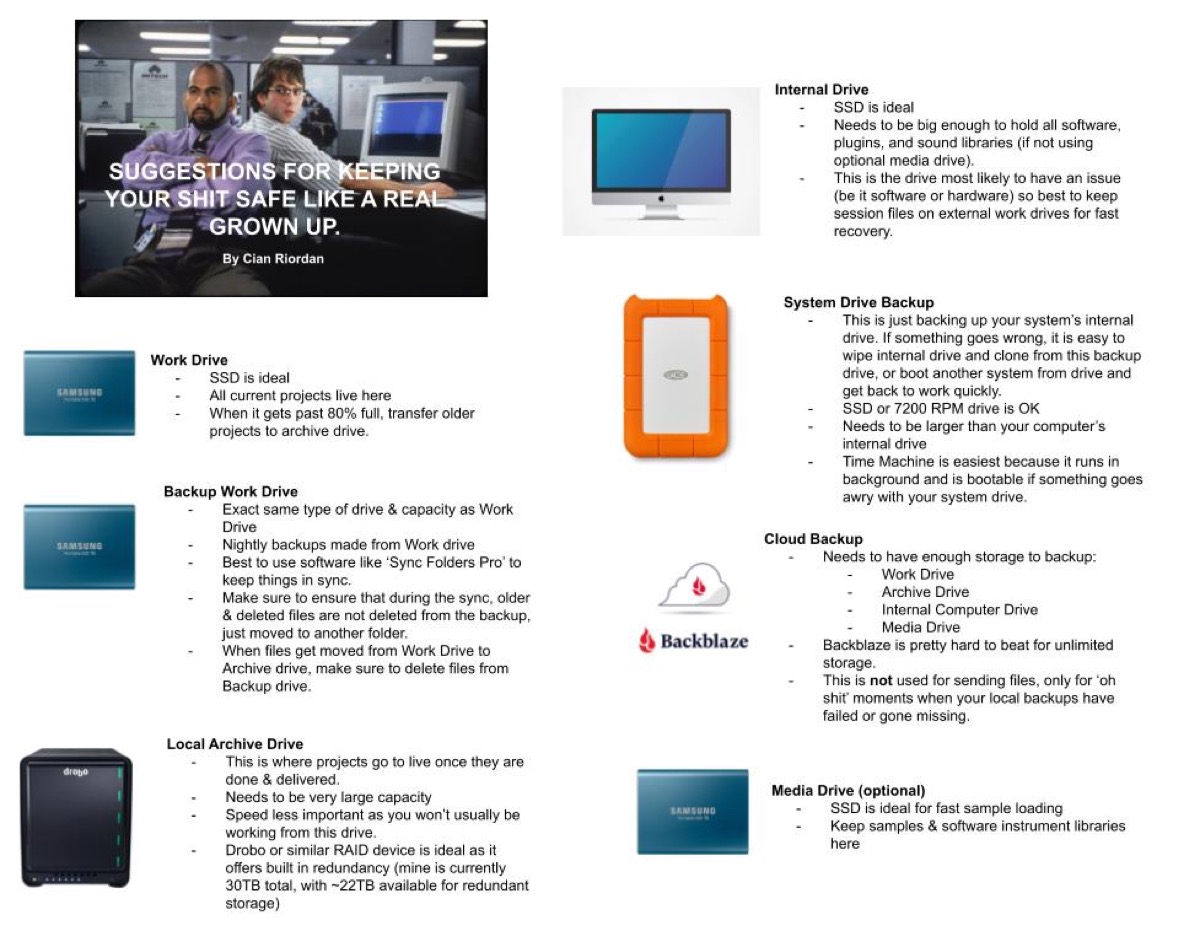 cian riordan — 2021-11-01 — Finally listened to the backup episode from a few weeks ago. And given Matt’s recent debacles, I feel like this is a pretty great system for covering …
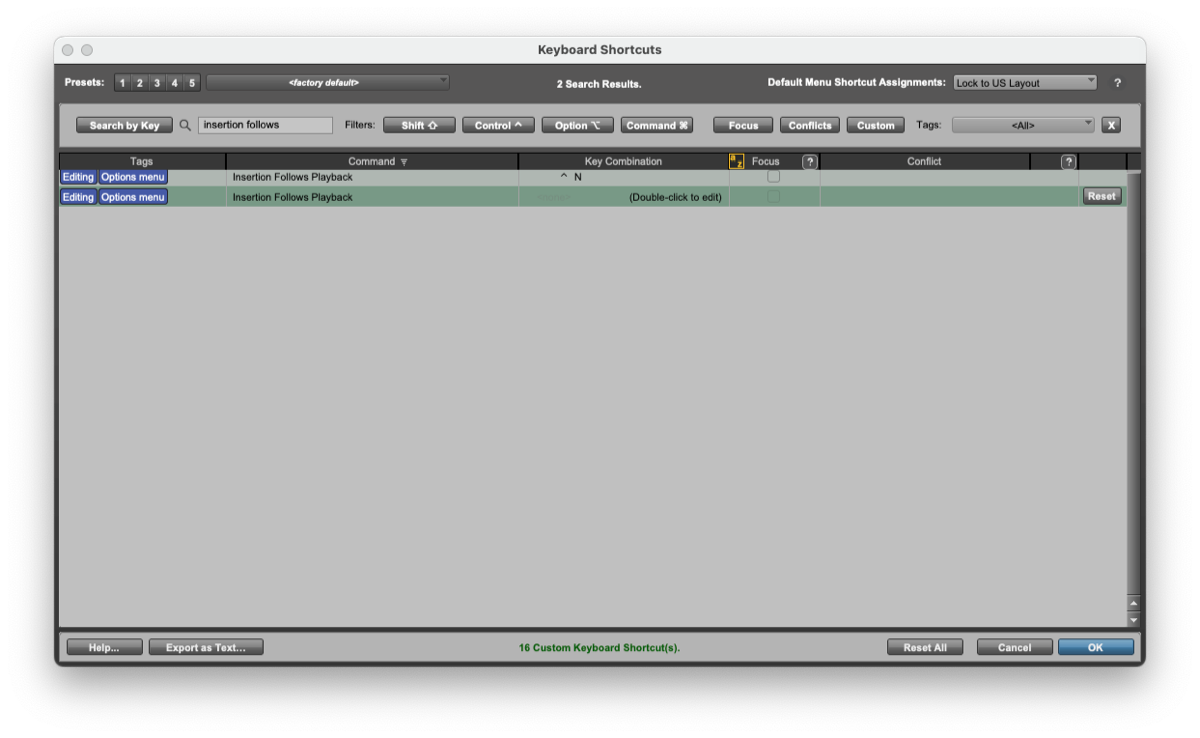 Will Melones — 2022-10-04 — Yeah no need for System Prefs tricks anymore…you can just unassign it in PT’s Keyboard Shortcuts!
 Ross Fortune — 2023-01-28 — Realised that Acustica has been taking up a spare +20GB on my HD. Little bin icon top right of Aquarius purges this unnecessary double storage of down…
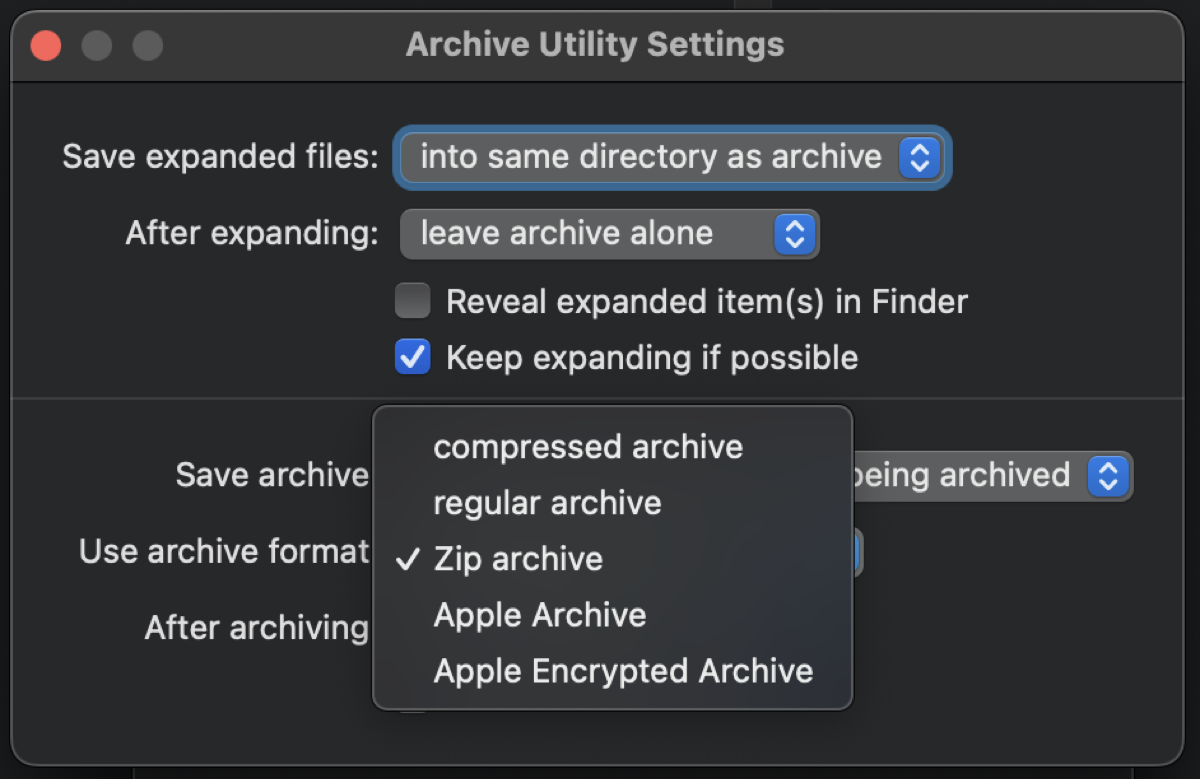 Will Melones — 2024-01-23 — Interesting update to this Finder thing. I had noticed that the Archive Utility settings were defaulted to “compressed archive” format and figured tha…
Source Discussions
Discord Source
Channel: daw-talk — Date Range: 2021-02 to 2026-02 Key contributors: cian riordan, Edward Rivera, Adam Thein, Rollmottle, Will Melones Message volume: 250 categorized messages
Discord Source
Channel: 🧠nerd-talk — Date Range: January 2024 – February 2026 Messages: ~58 (NAS/ZFS storage, TrueNAS configuration, Synology optimization, backup infrastructure) Key contributors: popthetrunk (both pinned messages), cian riordan, Rob Domos, Nomograph Mastering Notable: Both of the channel’s pinned messages are popthetrunk’s NAS/ZFS configuration guides See also: nerd-talk Channel Summary
Discord Source
Channel: logic-pro — Date Range: 2024-02 to 2026-02 Key contributors: spectrummasters, hyanrarvey, Iwan Morgan, Mark_Tarlton, kalpipal Message volume: ~25 messages on package vs folder, cloud collaboration limitations, Time Machine, and NAS caution See also: logic-pro Channel Summary